Showing posts with label ICT Applications. Show all posts

Wednesday, June 24, 2015

Gmail enables “unsend” option for all users


Had existed as "Labs" option for six years; no other major webmail service offers it.


by Sam Machkovech - Jun 23, 2015 2:10pm PDT Ars Technica


Whew, that was close.
Sam Machkovech

More than any other Google offering, Gmail has been bolstered for years with a range of weird options tucked away in a "Labs" tab in the settings screen. On Tuesday, one of the webmail provider's most interesting Labs options, "undo send," graduated to official status.

With the option, Gmailers get the chance to click an "undo send" link at the top of the screen after clicking "send" on any e-mail message. As with the original Labs version, the option, which now lives in the service's "general" settings tab, lets users pick a safety timespan between 5-30 seconds. Messages won't actually send until that time runs out, unless a user clicks the "view message" tab next to "undo," at which point a message will immediately whisk through the Internet's many tubes and reach its recipient.

The six-year-old option, which won't be turned on for the general public by default, had previously lived in Gmail's Labs tab, so if users wanted to enable it, they had to bypass a stark warning about "experimental" features that could "change, break, or disappear at any time." Major competitors like Hotmail and Yahoo Mail have yet to offer a similar option.

"Undo send" wasn't actually Labs' most stark "whoops, didn't mean to send that" option; that honor belongs to 2008's Mail Goggles, which made users solve math problems before they could click send on late-night e-mails. Sadly, that drunk-send-prevention option was discontinued in 2012 with little fanfare.

Monday, June 22, 2015

How Facebook is teaching computers to see


by
Stacey Higginbotham
@gigastacey JUNE 15, 2015, 1:15 PM EDT  Fortune


Facebook’s Moments feature uses facial recognition, but there’s a lot more Facebook can offer with better computer vision and AI.
Facebook today launched its Moments product, which uses Facebook’s image recognition abilities to scan your photos for your friends and then lets people create private photo albums with a particular group, such as the people in the photo. The idea is to make it easier to share photos from a big event among attendees without the cumbersome process of emailing snapshots to everyone or the awkward end-of-event huddle while six people take the exact same group shot. It’s not a cure for cancer, but behind the scenes of this new feature is an impressive technology that Facebook has been working on for years.

A key element of the Moments feature is the ability for Facebook’s algorithms to recognize people’s faces across different photos, so that Moments knows who was at the event. This requires computer vision expertise that companies such as Google, Microsoft, Baidu, and others are currently researching for everything from self-driving cars to silly web products such as Microsoft’s How Old Do I Look?

In launching the Moments product Facebook is sharing data about its own successes in computer vision research. Namely, that Facebook can recognize faces with a 98% accuracy, and it can do so quickly—the company says it can identify you in one picture out of 800 million in less than 5 seconds. Finally, it can do all of this even if it doesn’t have the full frontal shot of your face (or even if your face isn’t in the photo at all), thanks to a machine learning algorithm that can look at other elements in the picture and associated with the photo’s data.
Facebook
Inside Moments
Fortune spoke with Yann LeCun, Facebook’s director of artificial intelligence research, to understand how his team helped a computer understand who you are, and where Facebook is heading next with its AI research. Perhaps the first thing to understand is that when LeCun discusses computer vision, it’s not the same as how a person sees, although the process of teaching software how to recognize an object has some similarities.

For example, Facebook’s facial recognition, which is the basis of the current efforts, can’t identify you. It only can recognize if a person in one photo is the same as a person in another photo. 
Identification is a completely separate step.
Because Facebook is about connecting people, its computer vision efforts have focused on recognizing faces as opposed to cats, cars, or other non-human subjects. To do this, it uses a database of celebrity and politicians photos called Labeled Faces in the Wild. This collection of images has 13,000 photos of people with different hairdos, different outfits, sometimes wearing glasses and more. Facebook used this collection to train its machine learning algorithms. Other companies have used this data set as well, and some universities have even trained systems with a higher than 98% accuracy rate using Labeled Faces.

So how did Facebook get from giving a machine a picture of Angelina Jolie to somehow using that photo to help identify your sister across different photo albums on Facebook? LeCun is the man to ask. About 20 years ago when he was working at Bell Labs (now AT&T’s Image Processing Research Department), he happened upon a way of thinking about teaching computers to see that wasn’t really used outside of academia until about three years ago.

How computers learn to see
That technique is called convolutional neural networking, and takes its name from both a mathematical operation called a convolution, and inspiration from how the human brain learns. The brain learns by establishing connections between neurons, and the more often a signal is sent over those neurons, the denser those connections get. In a similar vein, when computers establish similarities between two images it assigns a weight to those similarities. In convolutional neural networks, the goal is to train the machine to recognize the changes in weights between those connections so it can tell with increasing accuracy if the image matches.

The process of doing this is incredibly complicated and involves different calculations that work to establish how important certain aspects of the image are to the actual process of recognizing what the image is. For example, if you want to train a computer to recognize faces, the pixels related to the background are less important. The tricky—and frankly amazing— part of this is that the machine learns on its own how to tell what part of the image is most relevant, and then can generalize those relationships going forward. It still takes a lot of human effort to nudge the computer into recognizing the right way to weight the similarities, but once the model is built, it can generalize going forward.

The process can take a few days on a powerful computer.

Convolutional neural networks have become the basis for almost all of the computer vision research done today, after a team of researchers led by Geoffrey Hinton at the University of Toronto, used that technique to win a competition where image recognition algorithms vie to be most accurate. Hinton, whose team and startup were lateracquired by Google, won the competition with a test error rate of 15.3%, compared to 26.2% for the second-place winner.

Don’t post that photo!
As research continues, the opportunities for use in our day-to-day life are significant. Yes, there is the ability to match people’s faces in a crowd that might lead to greater government surveillance, but there is also an opportunity to use better facial recognition to manage your privacy. For example, with automatic facial recognition at scale, any picture of you uploaded to Facebook (or perhaps even the web) could result in a notification.

For example, if you are somehow captured in the background of a tourist shot of Times Square, you could get a notification and the option to blur your face. Applied to children, the blurring or removal could be automated. LeCun notes that Facebook is interested in such tools, but also stresses that Facebook’s interest in machine learning goes far beyond image recognition.

Facebook’s goal is to get a computer to understand empathy. Obviously, it won’t be able to feel what humans do, but it can be trained to recognize what emotions are and how people will react. With that level of understanding, Facebook could, say, offer a warning when you are about to post a photo of you drunk and ask if you really want to do that.

“This would not be face recognition,” said LeCun. “We don’t care who is in the picture. We would use other types of image recognition and train them differently to say that this looks embarrassing and then tap you on the shoulder to make sure you want to post this publicly.”

This isn’t something Facebook can do today, but LeCun offered these concepts as a thought experiment to show where Facebook could head with its AI research. Of course, this sort of expertise informed by an algorithm can make people deeply uncomfortable. Today Facebook doesn’t turn on its auto tagging features in countries like Canada and the EU because of privacy concerns, and there’s a certain creep factor in having a computer second guess your photo-sharing choices or having software trying to parse your jokes to try to understand what you find funny.

“What we’d like to do is make machines more intelligent, understanding text, images, videos and posts,” LeCun said. “Anything that can happen in the digital world we want to understand the context.” Because there is so much digital content people could easily become overwhelmed by the information flooding their feeds. The efforts of LeCun’s team will help connect people with the content that is most relevant to their interests and priorities. It’s a complex solution to a simple goal: to make sure that you see what you want to see on Facebook.

“That’s the big mission that we at Facebook are trying to fulfill,” LeCun said. “Machines that understand people.”

Thursday, April 9, 2015

NPR: A 12-Year-Old Girl Takes On The Video Game Industry

APRIL 08, 2015 4:04 PM ET  NPR
STEVE HENN  JESS JIANG

Listen to the Story
All Things Considered
4 min 58 sec
Playlist
Download
Transcript

You have to pay to play as Scarlett Fox, a character in the mobile game Temple Run.Imangi Studios

Maddie Messer is 12 years old. She loves science, her dog, and a good video game. One of her favorites is the mobile game Temple Run.

In Temple Run, you run along a path through a swamp or a forest, while being chased by a tribe of fierce monkeys. Maddie loves the game, except for one thing: Her character is a guy.

In a lot of video games, the default character is a guy. If you want to play as a female character, it's not easy. Often you have to pay.

"It's not fair," Maddie said. "Because if I'm being forced to play as a boy, like, why?"

Maddie decided to test her claim with a research project. She downloaded the 50 most popular games in the same category as Temple Run. She counted up how many offered female characters and how much they cost. And she handwrote her results on a spreadsheet.

Out of the 50 games, 37 offered free male characters. Just five offered free female characters.

"I was hoping there would be more girls. But there just weren't," Maddie says. "And I was kind of bummed, like, come on!"

Maddie found that in a lot of the games, she could unlock the female characters by playing the game and amassing credit, but that could take hours. Or she could buy the character. On average, the female character cost $7.53.

In one Disney game, there was just one female character. She cost about $30.

Maddie wrote an op-ed with her research results. And The Washington Post published it. People all over the world saw it, including the makers of Temple Run.

"It was embarrassing. It was embarrassing to read that," says Natalia Luckyanova, one of the creators of Temple Run.

As Natalia and her husband were creating Temple Run, they realized a lot of the people playing the game were female. So they added female characters. And since Temple Run was free, they decided to charge for those new characters. The female characters didn't have special powers in the original game. But still, 60 percent of the players were female, and the women characters brought in a lot of cash.

Natalia had stumbled into an age-old business strategy. Economists call it price discrimination. Businesses charge different people different prices for nearly identical goods. Airlines do it when they charge different prices for the same seat on a flight. And movie theaters do it when they charge less for students or senior citizens.

But when a business charges different people different prices based on gender, price discrimination starts to look a lot like gender discrimination.

Natalia, the Temple Run creator, says Maddie has a point. "For all of our good intentions, and for all of my good intentions, it's true that you start out with this male character. ... The white male is always the default, and anything else, it's like, you have to work for it."

The very same day Maddie's op-ed came out, Natalia and her husband wrote to Maddie. They told Maddie she was right. Soon, they say, there will be a free female character in Temple Run.

Disney is also changing its pricing. They'll no longer be charging $30 for its character.

The makers of one game went a step further. They created a new character, called Maddie.

Tuesday, April 7, 2015

TestOut Office Pro - Free Instructor Access


Introducing TestOut Office Pro
Teaching Office Applications Has Never Been Easier


Prepare your students for academic and career success as they learn, practice, and master their introductory skills in Microsoft Office 2013© applications and computer basics. Offer your students an engaging course and eliminate the need for textbooks. Educators get free access, so start your evaluation today.


This course includes:
  • 148 labs to give students hands-on experience 
  • 112 engaging videos and 90 fact & tip sheets 
  • Automatically scored labs and exams 
  • Office Pro Certification exam to validate skills, not just memory 
  • 24/7 online access to allow students to practice in or out of class 
Start your evaluation now in preparation for the start of your next class. Request free instructor access.

Regards,


Jeff Randall
Product Manager
TestOut

Office Pro | PC Pro | Network Pro | Security Pro | Windows Server Pro | Windows Client Pro | Routing & Switching Pro

© 2013 TestOut Corporation, 50 S. Main St, Pleasant Grove, UT 84062 USA
If you prefer not to receive emails from TestOut you may unsubscribe or set your email preferences .
EREF:F161CB9B-7ED9-E411-82F9-00155D018222

Wednesday, March 25, 2015

After a year, Pixar sets Renderman software free (as in beer)

Rendering engine used for Hollywood films available for non-commercial use.

by Lee Hutchinson - Mar 24, 2015 7:47am PD Ars Technica


Do you want to build a snowman? Or render volumetrically? This beam diffused sub-surface scattering is just a sampling of the magic of 3D! You used to have to pay us, but now you don't because Renderman is freeeeee! Do you want to build a snowman (it doesn't have to be a snowman)? Download me!
Disney

Last year Pixar announced that it would be releasing a "free" (that is, available without cost) version ofRenderman, the in-house rendering engine that produces the visuals in all of Pixar’s animated films and many other Hollywood blockbusters. Though the actual release process ran into some delays, it has finally happened: Renderman is now free for non-commercial usage on Windows, OS X, and Linux.

FOSS advocates will take note that the software is free-as-in-beer, not free-as-in-speech—that is, while Renderman can be downloaded and used non-commercially without paying anything, it has not been open-sourced (and we bring the distinction up because that’s what more than half the story’s discussion thread on Slashdot has focused on).

To download Renderman, Pixar requires you to register for a forum account and provide a valid e-mail address. Once that’s done, you are given an installation package which in turn downloads the actual Renderman components appropriate for your operating system and 3D package.

And that’s an important caveat: would-be auteurs looking to make the next Toy Story can’t just grab Renderman and get their CGI on, because Renderman is only a rendering engine. In order to actuallydo anything with it, you need a 3D modeling and rendering application or application suite, likeAutodesk Maya, which can cost thousands of dollars. The most popular free 3D application, Blender, doesn’t yet work with Renderman.

Pixar has also setup a FAQ page with additional details on specifics of the Renderman noncommercial release. It appears that the company is keeping to a very strict definition of "noncommercial," since one answer on the page explicitly states that nonprofit entities which "generate revenue through entrance or member fees, service charges, subscriptions etc" (like churches or charities) are considered commercial users and are ineligible for the noncommercial free release.

Friday, March 20, 2015

Jaw-dropping Magic Leap demo shows off our augmented future

by Andrew Tarantola | @terrortola | engadget


Google's multi-million dollar investment in augmented reality startup Magic Leap appears to be paying off if this demo reel is any indication. In it, the fledgling AR firm shows off what a year and half a billion dollars can accomplish. That includes productivity functions like being able to access both websites and desktop apps from airborne virtual icons. There's also the promise of an immersive shooter game using physical weapons as its controllers and the world around you as the environment. Do want.


It's like a scene straight out of Dennou Coil. "You can think of us as techno-biology," Magic Leap CE Rony Abovitz told a Reddit AMA last year. "We believe it is the future of computing." Now we just need to know when that future is actually going to arrive and how many arms/legs it will cost once it does.

Friday, March 13, 2015

Fluency with Excel and Word Are Key to Getting a Higher-Paying Job

Kyle JamesProfileFollow

Kyle James
lifehacker


Finding a good paying job with just a few college courses (or less) under your belt can be daunting. Even so, you may be surprised to hear that employers still want basics like Excel and Word before other, more advanced skills. Land those and your chances of scoring a gig with a living wage rise significantly.

According to a recent study from labor-market analysis firm, Burning Glass Technologies, not having these basic skills immediately removes you from two-thirds of potential "middle-skill jobs"—jobs that include office administration and retail management, for example, and pay 13% more on average than positions that require zero computer skills.

If you've already mastered Excel and Word, consider tackling Photoshop and CRM software to really see a big jump in pay. To see just how much those digital skills will net you, check out the full article below.

Spreadsheets are one of the most mystifying pieces of software you'll encounter in your adult…Read more lifehacker.​com

Crunched By the Numbers: The Digital Skills Gap in the Workforce | Burning Glass Technologies via Wall Street Journal

Photo by archie4oz.

Thursday, March 5, 2015

Linux Treasures: 11 Sublime Native Linux Apps That Will Make You Want To Switc


makeuseof
Justin PotOn 4th March, 2015
Linux

Why should you use Linux? To use some of the best applications made for any platform. If you don’t believe me, here’s a list of great Linux apps.

You can find all of these in the default Ubuntu repositories, and likely in the repositories of whatever Linux distro you use.
FocusWriter: Beautiful, Distraction-Free Writing
Almost every job requires that you spend at least some time writing, but it’s a hard thing to do in the web era: distractions are everywhere. Focuswriter helps by blocking everything else on the screen. Even better: you can set up a gorgeous background, giving you a calm place to focus on what you need to do.


If you’re looking for an easily customizable distraction free writing app, you found it.
Pithos: The Best Looking Pandora Client, Period
We’ve highlighted some great Linux radio apps, but none come close to Pithos. This Pandora client is the best we’ve seen on any platform.


You can see what’s playing, complete with album art, and even see (and edit!) what’s coming up. There are some great Mac apps for listening to Pandora out there, but nothing quite as nice as Pithos is on Linux.
Zim: Your Personal Desktop Wiki
Evernote is all well and good, but if you really want to organize your thoughts in a way that’s easy to browse later it’s hard to beat a personal wiki. And Zim is possibly the best personal wiki software out there.


How useful this is for you will depend completely on how you use it, of course, but this app is seriously useful for organizing your life.
GPodder: Possibly The Best Podcast App Out There
If you’re a podcast fan, you know how frustrating the search for a decent podcast client can be. The assumption seems to be everyone is using iTunes, so why bother? That’s not the way the gPodder team thinks, and we’re grateful.


This program is the best way to manage your podcasts on any platform, and while there are ports out there for Mac and Windows gPodder just doesn’t feel at home on those platforms.
Bluefish: Great Editor for HTML and More


If you occasionally need to edit HTML files, you need to check out Bluefish. This editor includes quick tools for doing just about everything. It’s not easy to use, granted: this is certainly an HTML editor for programmers, but it’s one of the best apps out there for what it does.
Music Player Daemon: Amazing Lightweight Music Player
This one isn’t easy to use – it’s kind of a bitch to set up, actually. But once you get it working, it feels like magic – especially if you have a device with it attached to your stereo.

Music Player Daemon (MPD) isn’t like other music software: it runs in the background on your computer, and can be controlled with a number of different clients. Some of these clients are graphical, others are command-driven. The real fun: a client on one computer can control the daemon running on another computer. Imagine a Rapsberry Pi hooked up to your stereo, which you can control using any other device in your house.

If this sound interesting to you, check out the documentation. It’s a little hard to get started with, but the results are worth it: this is the best music player out there for Linux.
Guake: Drop Down Command Line, In One Keypress
Most Linux users grow to love the command line in time—it’s just a matter of learning the essential commands. Guake gives you fast access to commands: just press a single key and a prompt launches.


Press the same key again and it goes away. It’s the fastest way to type a command, and it willchange the way you work with the terminal.
GParted: World-Class Partioning Software
Every time I need to edit partitions on my Mac or Windows machines, I wish I could use GParted—the ultimate partitioning software. It handles partitioning in a way that’s easy to visualize, and offers support for all major filesystems.


Happily, you can use GParted on any computer whether you’re a Linux user or not, thanks to the GParted Live CD. Keep one around—you never know when it might come in handy.
FBReader: A Simple EBook Reader
When it comes to ebook reading software, most apps try to way too much. FBReader is a refreshing exception to this rule, offering you the ability to read books and not much else.


Seriously: I wish I could find something this simple for Mac, but I can’t. Happily it’s available for Linux.
Minitube: Beautiful, Fast Interface for YouTube
Search for something on YouTube, get instant results. Then watch all of them. Minitube is a simple thought executed well, and is great for older computers that struggle with flash.


It’s the best way to watch YouTube videos. And yes, it is available on Mac and Window for a price—but the Linux version is free.
Package Managers: The Best way to Install Software


Whether it’s from the command line or a GUI tool like Synaptic (pictured), package managers are the best way to install a bunch of software quickly—and get all of your updates from one central program. Windows and Mac have their app stores, sure, but those closed ecosystems can’t match Linux package manager’s flexibility. You can add additional repositories to install software from unofficial sources. You can install multiple programs by typing a single command, or by checking them off in a list.

Every distro comes with its own package manager, but all of them are miles ahead of what’s out there for other systems.
What Else? Let us Know
I could go on. Most of the default apps that come with ElementaryOS, a minimalist Linux distrocould fit in here, for example.

But rather than expand on my tastes, I’d like to hear about yours. Which amazing Linux apps have I missed? Let me know in the comments below, so your fellow readers can benefit.

Image Credits: Colorful gemstones Via Shutterstock

Tuesday, February 24, 2015

The Current State of Cryptocurrency


Bryan ClarkOn 23rd February, 2015  MakeUseOf
Technology Explained

It’s been a wild ride for cryptocurrency since Bitcoin (BTC) became the first decentralized digital currency in 2009.

Since then, millions of transactions have been made, millions of dollars have been stolen or lost, and we’ve seen the rise of several new cryptocurrencies with exciting and innovative new technology, and safety measures behind them.

It’s an interesting time for the future of digital currency, but that doesn’t mean there aren’t major hurdles to clear before we ever begin to see any sort of widespread adoption. We’re – mostly – on the right track, but that doesn’t mean there aren’t significant challenges for the fledgling cryptocurrency markets.

While the early days of cryptocurrency were rather notorious due to its widespread usage on dark net sites, such as the – now defunct – Silk Road, we have seen some key mainstream adoption indicators in recent years.


Major Highlights
2014 saw a few big wins for cryptocurrency supporters. Each of these wins puts the currency one step closer to widespread adoption, and I doubt anyone would deny that 2014 brought a lot of momentum and awareness of digital currency – or at least Bitcoin – to the forefront.
Record Setting Bitcoin Prices

In the early stages of Bitcoin, you could buy the currency for less than a penny. In fact, one early user – “laszlo” – used 10,000 Bitcoins to make the first real-world transaction with the currency. He bought 2 pizzas for 10,000 BTC. At its peak value, that 10,000 BTC would have been worth over $10-million USD. That’s some expensive pizza.

Over the years, Bitcoin has seen numerous peaks and subsequent crashes. However, 2014 was a wild ride for the coin as prices maxed out at approximately $1,250 USD before taking a sharp plunge into the low $300’s by April of 2014. The currency has continued its downward momentum since then, and currently sits in the $200’s depending on the marketplace source.


Widespread Media Attention
As the price of a single Bitcoin continued to rise, so did its media profile. Major news outlets like CNN, Fox, CNBC, Al Jazeera, and others jumped on the cryptocurrency bandwagon and started reporting about digital currency, the upward trajectory, security concerns, and its ultimate collapse. Since then, we’ve seen a sort of disappearance of Bitcoin and cryptocurrency in the media, but the attention did bring about some awareness for alternative currencies.
Major Retailer Adoption and the Christmas of 2014

In September of 2014, Overstock.com became the first large retailer to accept Bitcoin. After the initial announcement, the dominoes started to fall and many other retailers began to announce their acceptance of the currency for the upcoming Christmas season. Here are just a few of the companies that jumped on the Bitcoin bandwagon that year:
  • Expedia
  • Dell Computers
  • DISH Network
  • Reddit
  • Paypal
  • Tiger Direct
In addition, other major retailers, such as Wal-Mart, Nike and Amazon take Bitcoin (indirectly) through the use of gift cards from companies like: eGifter, Gyft, Giftcard Zen and GiftcardBTC. While there are more stores that won’t accept these cards than those that do, it’s still a positive sign when retailers of this size are accepting Bitcoin – albeit indirectly.
The Rise of Litecoin and Other Alternative Currencies


Until late 2013, it was all about Bitcoin. Other technologies existed in the cryptocurrency space, but none with any real traction or marketshare that came close to that of Bitcoin. In 2013, this began to change, as Litecoin started to gain some real traction, as well as some notable PR. The sudden spike in Litecoin pricing included a 100-percent leap in a single day, as well as a $1-billion USD market cap by the end of 2013. Many started to tout Litecoin as the successor to Bitcoin due to the improved technology and security-related fixes to its supposed predecessor.

The rise of Litecoin planted it firmly in the number two spot, behind industry-leader, Bicoin. This all changed in 2014 when a new kid on the block, Ripple, started to make waves with a change in the core technology behind cryptocurrency and a currency-agnostic approach to the way that cryptocurrency is bought and sold.


The aim of Ripple was to decentralize the exchange points that other services, such as those that Bitcoin relied on to process each transaction. This approach would hypothetically add increased security to each transaction as there was no centralized market to hack, and the liquidity of Ripple allowed multiple ways to buy and to sell the coin, such as: fiat currency (Dollars, Yen, Pesos, Euros, etc.), other forms of cryptocurrency, or technology-related commodity items such as frequent flier miles and mobile minutes.

Strictly speaking, Ripple isn’t a cryptocurrency per se, but rather a decentralized payment network that supports multiple currency exchanges. That said, you can trade Ripple (XRP) like you would any other cryptocurrency, the difference is that it’s relying on other currencies in order to have any real value. This isn’t unlike Bitcoin, which until recently was rather worthless without the ability to cash it out into fiat currency.
Much Cryptocurrency, Many Money, So Doge
Dogecoin is yet another of many new cryptocurrency technologies, but it’s particularly notable due to the press it gained in 2014. The currency itself, which is named after the “Doge” Internet meme featuring a Shiba Inu and seemingly random bits of Comic Sans text, was mostly spurred by its adoption within the Reddit community as a charitable currency for tipping others based on helpful or humorous comments on the site.


Reddit sent the cryptocurrency “to the moon” after using it to raise $50,000 USD to send the Jamaican Bobsled Team to the Sochi Winter Olympics after they qualified, but could not afford to go.

Next, Reddit used the momentum fueled by the media after their Olympic fundraising efforts to raise, and donate 40-million Dogecoin (more than $30,000 USD at the time), before World Water Day on March 22nd. The project was a success, and the money went to funding a well in the Tana river basin in Kenya under the supervision of Charity:Water.

Reddit wasn’t done yet. In March of 2014, the Dogecoin community raised over $50,000 USD to sponsor Nascar Driver, Josh Wise. Wise ran the Aaron’s 499 at Talladega Speedway with a Dogecoin and Reddit sponsored paintjob featuring Doge, and the Reddit mascot, Snoo.

Dogecoin has been a fast mover, but still lacks the widespread adoption of other forms of cryptocurrency, such as Bitcoin, Litecoin and Ripple. It currently sits at the number six spot on the list of cryptocurrencies, in terms of market cap, after peaking as high as third.
Setbacks

It hasn’t been all sunshine and rainbows for cryptocurrencies. There are widespread fears as to the safety and liquidity of owning the digital currencies, as well as what – if any – government regulations will be made.
Mt. Gox Shutdown
The shutdown of the largest cryptocurrency exchange and its subsequent filings for bankruptcy protection were a major blow to the digital currency markets. However, theproblems with Mt. Gox didn’t start or end there.

Over its notorious history, Mt. Gox had its share of problems. They ranged from withdrawal freezes, to multiple trading incidents (one which resulted in the price of BTC on the network to temporarily drop to 1 cent), lawsuits, missing or lost coins, and ultimately a seizure of funds by the United States Department of Homeland Security.

After closing the doors for good, stories began to circulate – and were confirmed by Mt. Gox – that over its short history it had lost over 600,000 BTC that could have been worth over $800-million USD depending on when they were lost or stolen.
Chinese Restrictions
As Bitcoin soared to record levels at the end of 2013 and beginning of 2014, much of this success was attributed to additional demand in China. By the end of 2013, China started to reverse this trend after fears related to government action induced a panic and large scale sale of Bitcoin back into the open market. This influx of newly available coins led to sharp price drops in the market and a panic sale for many of those outside of China. The Chinese-induced panic was initially caused by China’s Central Bank issuing an order for financial institutions to stop accepting the currency, and further sent the cryptocurrency market spiraling when this ban extended to online payment processors such as YeePay.

As China began to pull out of the Bitcoin market in late 2013, the increased demand led to the price of each coin falling to approximately $300 USD by April of 2014.
Where Do We Go From Here?


Apple Pay and Google Wallet continues to improve, the future of cryptocurrency begins to look a lot brighter. One of the major hurdles to widespread adoption is the lack of a physical form of payment such as cash or a credit card, and instead relying on a digital transaction to purchase goods from brick and mortar retailers. As digital wallet adoption increases (if and when that happens) and more people become comfortable with the idea of digital wallets that process cash and credit card transaction instantly, currencies such as Bitcoin become infinitely more viable.

The future of cryptocurrency is exciting, but in order to ever reach mainstream consumer adoption, many things still have to happen, such as: increased retail adoption, trust in digital wallets, and improvements to security in cryptocurrency protocols. If, and only if, all of these things happen, cryptocurrency could just take over the world.

Image credit: Bitcoins by Zach Copley, Bitcoin Accepted by Theresa Rios, Litecoin by BTC Keychain, Google Wallet by Eric Pakurar, all via Flickr; Ripple Logo via Wikimedia Commons

Saturday, February 21, 2015

BBC: How random is random on your music player?

18 February 2015 Last updated at 19:01 ET

By Dave LeeTechnology reporter, BBC News

There I was, walking to the railway station, minding my own business, when... bam!
Our song.

That's the gamble you take when you set your device to "random". Sometimes you get good songs, sometimes you get bad ones. Sometimes you get songs that remind you of someone that was once in your life.

I skipped it. Buddy Holly saved my mood, and saved the day.

Until home time. Hopping on to the Tube, press play. It was back. Our song.

Twice in one day? What did it mean? What was the universe trying to tell me? It was almost Valentine's Day - should I get back in touch?


How Random is Random? can be listened to on this week's episode of Tech Tent on the BBC World Service.Listen again to this week's episode

Don't be daft.

Skip.

Chin-strokers

When we attach so much of our own emotion, be it a place, memory or person, into the songs we cherish, eerie coincidences brought up by shuffle or random functions can be unsettling.

Or in some cases just irritating. Five thousand songs, and it brings up three tracks by the same artist in quick succession? Come on now, that can't be right. This is supposed to be random!

Except, of course, it is random. Our brains just don't like it.

At the music-streaming service Spotify, developers have applied their finest chin-strokers to the issue. Users were complaining, they said, that their shuffle function was not random at all.

"Our brain is an excellent pattern-matching device," said Babar Zafar, a lead developer at Spotify, in an interview for Tech Tent on the BBC World Service.

"It will find patterns where there aren't any."


Users were complaining in their droves, he said, that Spotify was somehow forcing music upon them. Conspiracies included the idea that record labels had struck up some kind of deal to make sure some artists are heard more than others. Mr Zafar dismissed that thought as hogwash.

"The problem is that, to humans, truly random does not feel random," said Mattias Johansson, a Spotify software engineer, in a response on the question-and-answer site Quora.

"So we got tons of complaints from users about it not being random.

"Last year, we updated it with a new algorithm that is intended to feel more random to a human."

Coincidental jazz

The fact is that the human brain, for all its brilliance, is a sucker for coincidences. And more importantly, given the topic of this article, the brain is also keen to believe that something not happening for a long time makes it more likely to happen next time.

The theory is known as the Gambler's Fallacy or the Monte Carlo Fallacy, owing to one memorable night in 1913 when the roulette ball fell on black 26 times in a row.

Players at the table were betting huge amounts in disbelief, expecting the normal "random" order of the world to be set right with each spin.

The very foundations of the billion-dollar casinos of Las Vegas are built on the fallacy. There is a pernickety bit of our brain that thinks if we did not win the last five hands of blackjack we are surely going to get lucky when the next hand is dealt.

Las Vegas is built on the Gambler's Fallacy, the idea things will, surely, turn in our favour
When applied to how songs pop up on our music players, the fallacy means we, for some reason, think it less random when two similar songs play.

It is a lack of uniform distribution that throws us off, writes Martin Fiedler - a programmer who describes himself as an "average nerd".

Consider a playlist of 32 songs, he says, split almost evenly into three genres - 10 of genre A and 11 each of genre B and C.

A truly random playlist might spit out something like this: AACBBCBACABBCCACCCCABBACBACABABB

It is random, but it sure will not feel like it - and that block of four Cs in the middle there might be annoying. Particularly if they are jazz.

"This example, short as it is, already exhibits the two main problems of random shuffle algorithms," writes Mr Fielder.

"The first one is the burst of four adjacent C's in the middle of the sequence, the second one is the lack of B's in that area (there's no B for 8 slots, which is quarter of the whole sequence!)."

Music in uniform
So here is how Spotify solved the problem.

What our brains actually crave from "random" is that the three genres get spread nicely over the playlist.

Which, after a lot of mathematical magic, is what Spotify does now.

"Suppose we have a playlist containing some songs by The White Stripes, The xx, Bonobo, Britney Spears and Jaga Jazzist.

"For each artist we take their songs and try to stretch them as evenly as possible along the whole playlist."

Spotify's algorithm takes into account how long a playlist is, and how many of each type of song there are. So if there are four White Stripes songs in the list, they will each appear at roughly 25% intervals.

There is no chaos here - instead a highly structured and sophisticated way to trick your brain into thinking it is getting a great mix of shuffled tracks... that may or may not remind you of your ex.

Skip.

Friday, February 20, 2015

BBC: Barbie doll will be internet connected to chat to kids

17 February 2015 Last updated at 07:50 ET  BBC

The Hello Barbie will remember what children have said and mention it at a later date
Barbie is having a digital makeover, with the release of an internet-connected version of the iconic doll.
Toy maker Mattel is partnering with US start-up ToyTalk to develop Hello Barbie, which will have two-way conversations with children.

The Barbie will use a speech-recognition platform developed by ToyTalk.

A prototype of the doll was at the New York Toy Fair on 14 February, where a glut of smart toys were on display.

"The number one request we hear from girls around the world is that they want to have a conversation with Barbie. Now, for the first time ever, Barbie can have a two-way conversation," said a spokeswoman for Mattel.

The Hello Barbie will be able to play interactive games and tell stories and jokes.

A dinosaur, connected to one of the world's cleverest machines, is also being developed
It will also listen to the child's conversation and adapt to it over time - so, for instance, if a child mentions that they like to dance, the doll may refer to this in a future chat.

The doll requires a wi-fi connection and can provide an hour's worth of playtime when fully charged.

A microphone, speaker and two tricolour LEDs will be embedded in the doll's necklace, while rechargeable batteries in its legs can be connected to an external wall-mounted charger.

The doll is expected to sell for about $74.99 (£49). No release date has yet been confirmed.

Doll hack
Increasingly, the toy market is becoming saturated with smart versions of old favourites.

Back in November, the Vivid Toy group released Cayla, a doll that uses speech-recognition and Google's translation tools.

In January, security researcher Ken Munro discovered a vulnerability in its software, which allowed for it to be hacked to say things that might not be suitable for children.

A start-up, now live on Kickstarter, is developing a line of smart toys powered by the IBM-developed supercomputer Watson.

The first range from Elemental Path will be a smart dinosaur that can chat with children, tell them jokes and answer a range of questions.

"Toys have to keep up with the expectations of children," said Natasha Crookes, director of communications for the British Toy and Hobby Association.

"As long as children are protected from being able to access anything online, there is no harm in internet-connected toys.

"Companies take a lot of care making sure that there are white lists and black lists for content."

Some critics have questioned whether internet-connected toys endanger traditional, imaginative play, but Ms Crookes is not convinced.

"Such toys can enhance traditional play," she says.

"Some of the time, children will play with the toy in internet-connected mode, and some of the time they will play with them in the traditional way, using their imagination," she said.

Friday, February 6, 2015

How Google Docs' research tool removes drudgery from reports and presentations

Michael Ansaldo
Feb 6, 2015 3:28 AM  PCWorld

You’re frantically racing toward a deadline to complete a multi-page report or slideshow presentation, but research is slowing you down. Not tracking down the information so much as the constant bouncing between your work document and web browser, and cycling through the confusing morass of open tabs to find that webpage or image you need.

If you use Google’s free office suite, there’s an easier way—a built in research tool that lets you search for the information you need and easily add it to the Google Doc or Google Slide you’re working on without having to leave the page. Here’s how to get started.

Access the research tool
Google offers three ways to access the research tool pane. From within a document or presentation, click Tools > Research. If you prefer keystrokes, type Ctrl + Alt + Shift + I on a PC or Ctrl + ⌘ + Shift + I on a Mac. The third way is to begin a specific search by right-clicking a word (or in the case of a phrase, highlighting it then right-clicking) and selecting Research from the drop-down menu. In each case, the research pane will open on the right side of your document or slide.


The research tool puts several different search filters right in the document or slideshow presentation you’re working on.
Unless you’ve accessed it via selected text, the first time you open the research tool it will display a list of topics based on the content of your document or slide. But because the tool is just keying in on random words, these results aren’t likely to be useful. Instead, type your own search terms in the search bar.

The research tool offers several different types of results: Everything, Images, Scholar, Quotes, Dictionary, Personal, and Tables, each accessible from a drop-down menu in the search bar. Let’s look at each search type in turn and how to use them to add information, sources and citations to your document or presentation.
Everything
This is the default search and casts the widest possible net across the ‘Net. A typical search of say, a person, will yield a selection of applicable photos, some quick facts, a quotation or two, and a list of website results. Hovering over one of these web results will reveal several action options. Click Preview to open a preview of the website in a separate slide-out window. To add a link to the site to your document or spreadsheet, click Insert Link. To create a footnote citation for that link (document only), click Cite.
Images

To filter only image results, select Images from the drop-down menu in the search bar. Any of the resulting images can be dragged directly from the research pane into your document or presentation. A numbered superscript citation is automatically placed next to the image so you can cite the source. Clicking the image will open options to place the image inline or wrap or break the text around it. In the case of the last two options, you’re also presented with a drop-down menu of preset margin widths/depths to choose from.


Images can be added to your work right from the research pane.
Scholar
A Scholar search will troll Google Scholar for books, abstracts, peer-reviewed papers and other scholarly literature for information relevant to your search term. Results are presented as bibliographic entries. Click the accompanying link to open the actual publication in your web browser. To add the bibliographic information to your document, select Insert, and select Cite as footnote to add a citation.
Quotes
Select Quotes from the drop-down menu and enter either an individual’s name or a portion of a famous quote. When you mouse over a quotation result, you’re presented with a link to sources with more information on that quote. To insert the quote and its author in your document or spreadsheet, click Insert. It will automatically add a footnote citation as well.


Google’s research tool makes it easy to add a quotation, its author and a footnote citation to your document.
Dictionary
If you’re halfway through writing a report and realize you don’t remember the difference between “compose” and “comprise,” select Dictionary from the drop-down menu and enter one of the words in the search box. You’ll be supplied with definitions and synonyms from sources around the web.
Personal

Sometimes the information you need is not out on the Web but rather buried somewhere in your Google Drive account. In that case, use this search option. Select Personal from the drop-down menu and enter your search term and the research tool will return results from your Docs, Sheets, and Slides, as well as images from your Picasa account and posts from your Google+ stream. Click Preview to glance at the content, and Insert Linkto insert the item’s URL and title. Click Cite to add a footnote citation with the link (documents only). In the case of presentations, you can click Import Slides to choose slides to insert into your current presentation.
Tables
To add table data to your document or spreadsheet, select Tables from the search box before conducting your search. By hovering over a result, you can click Preview to see a full-size preview image, Cite to create a footnote citation for the table in your document or spreadsheet, or Export to export the table into Google Sheets or Google Fusion Tables.

Saturday, January 24, 2015

Office 2016 and Office for Windows touchscreens are due later this year


Office 2016 comes to desktops in 2H 2015, touch Office "later this year."


by Andrew Cunningham - Jan 22 2015, 10:15am PST ars technica


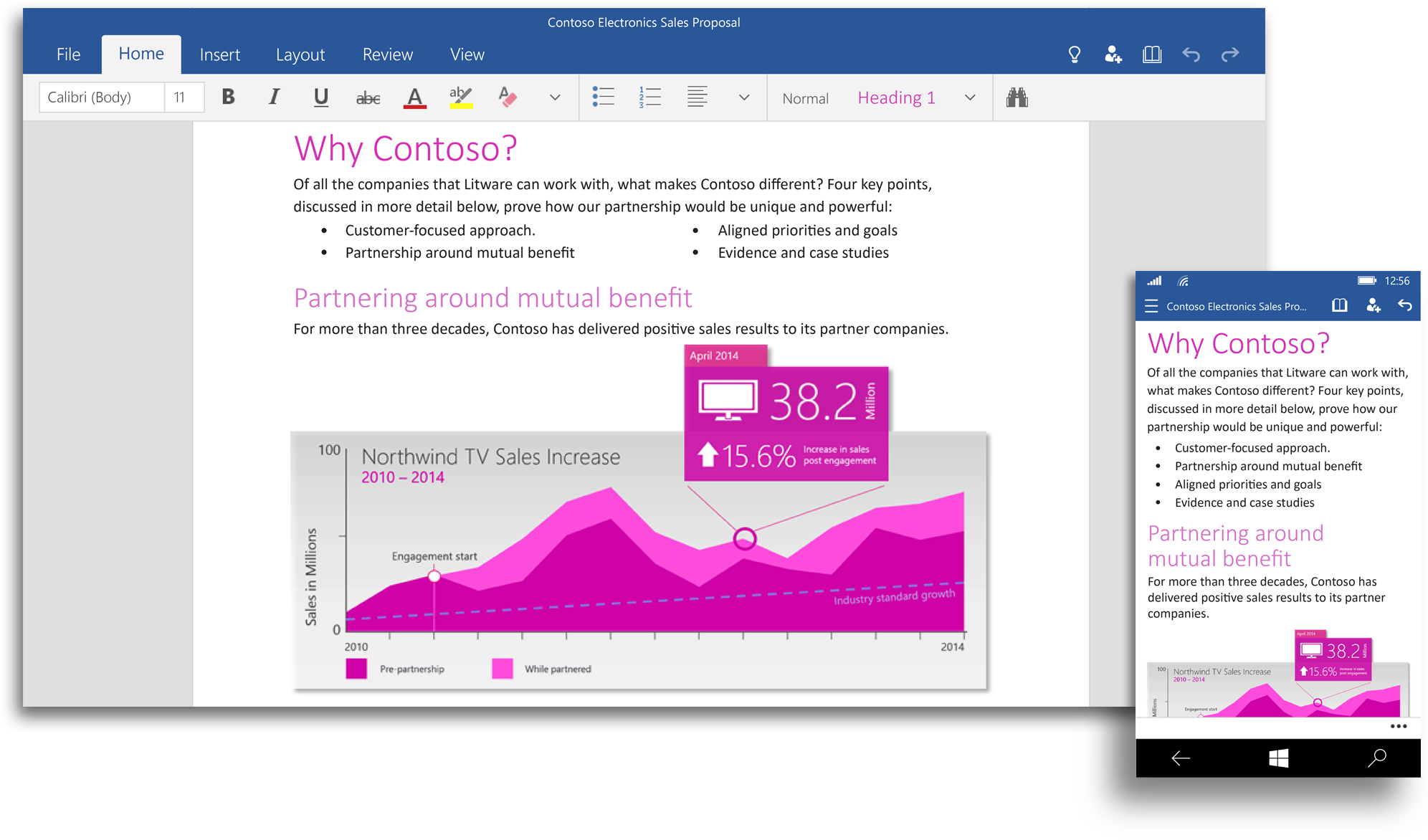
Word for Windows 10. These touch-optimized apps are separate from the desktop Office suite.
The Office tablet and phone apps for iOS and Android both ship with a touch-optimized subset of the features of the full flagship Office suite, and even though Microsoft is readying an Office release for Windows phones and tablets, the desktop version will still reign supreme. Microsoft says that the next version of the flagship suite, dubbed Office 2016, will be "generally available in the second half of 2015." It will remain optimized for keyboards and mice.

The touch-optimized Office apps for Windows 10 are still on their way, though, and Microsoft has shared some screenshots that show what the apps will look like on both phones and tablets. Word, Excel, PowerPoint, OneNote, Outlook Mail, and Outlook Calendar for Windows 10 (the official product names) unsurprisingly share a lot in common with the touchscreen apps for other platforms. Microsoft released Office for iPad in March of 2014, and that UI has served as the foundation for all the tablet versions of the suite, including the still-in-beta Android version. The phone-sized versions of the apps look more like the new iPhone versions released in November, not like the limited versions that are currently available on Windows phones.

We go hands-on and compare it to the also-free version of OneNote for Windows.

The Outlook app for Windows 10 is something we haven't seen on other platforms yet. Microsoft has released Outlook clients for iOS and Android, but they only support business-class Office 365 accounts and are more or less just wrappers for the standard Outlook Web client. The version for Windows 10 looks more full-featured, more closely resembling the desktop version of Outlook, at least in the three-column tablet view.

Pricing information hasn't been revealed for either Office version, but we'd expect Office 2016 pricing to be in line with what Office 2013 costs now (Office 365 subscribers can most likely expect it to be available at no extra charge when it's released). If the iOS and Android versions of the touchscreen Office apps are any indication, the Office for Windows 10 apps will most likely be free-to-use with some features locked behind an Office 365 paywall. Upgraded Mac versions of Word, Excel, and Powerpoint to accompany the new versions ofOneNote and Outlook for OS X can't be far behind, but Microsoft still hasn't shared specific information on any of them.

We'll continue to report on all these new Office versions as they draw nearer to release.

BBC: Bitcoin backers seek to create 'regulated' exchange


Winklevoss twinsThe Winklevoss twins have invested millions in the Bitcoin virtual currency

Related Stories

The Winklevoss twins, who clashed with Mark Zuckerberg over Facebook, are seeking approval for a Bitcoin exchange overseen by US regulators.
The pair plan to have the exchange, called Gemini, trading later this year, reports the New York Times.
Cameron and Tyler Winklevoss are known to have invested millions in the virtual currency.
Currently the value of each bitcoin is approaching $200 (£133) - far below the $1,200-high it hit in November 2013.
Lost money
Development work on software underpinning the exchange is being carried out at the Bitcoin start-up founded by the Winklevoss twins. In addition, they have been lobbying New York financial regulators to drum up support for the idea and have signed up banks to handle deposits and transfers.
Work on the exchange began after New York's financial services watchdog last year encouraged virtual currency entrepreneurs operating in the state to apply for formal recognition. This, said the watchdog, was the first step towards full regulation of such exchanges.
The twins won a $65m payout from Mark Zuckerberg after accusing him of stealing their idea for a college-based social network.
Bitcoin is a virtual currency built around a complicated cryptographic protocol and a global network of computers that oversees and verifies which coins have been spent by whom.
Exchanges, through which virtual money can be traded for real cash or to other owners, have been one of the weak points in the whole Bitcoin ecosystem. Some have gone bust leaving traders out of pocket, many have been robbed of all their deposits and now more and more nations are seeking to impose strict controls on how they operate.
The value of each bitcoin has fluctuated widely over the last few years but has been on a steady downward path since late 2013 even though many more online stores and companies accept them in exchange for goods and services.

Friday, January 16, 2015

Help Get CETF's Internet for All Message Heard During the State of the Union Address!

California Emerging Technology Fund

[Interesting social media strategy and application]


We couldn’t be more excited for this year’s State of the Union Address next week. President Obama will announce steps in the State of the Union to help more Americans, in more households around the country, get access to fast and affordable broadband. As we look forward to 2015, we remain committed to the millions of Americans without affordable Internet access.

The President gave us a preview of his vision for #BetterBroadband access. Join us on January 20th to be sure that the FCC is aware that the public is with the President in wanting affordable Internet.

We are using Thunderclap to make our message louder. Click Here to join the Thunderclap and you will see our message:

#FCC It's time for #BetterBroadband that includes affordable Internet at home for low-income communities now. http://www.internetforallnow.org/public_endorsements_for_the_5_recommendations?utm_source=Supporter&utm_medium=Email&utm_campaign=Thunderclap

Right now you’re probably asking yourself - what is a Thunderclap? It’s a web application that allows people to authorize a specific Tweet and/or post to Facebook all on the same day - and at the exact same time - in order to maximize the effect. Think of this action as an online flash mob in support of affordable, cheap Internet access for all. By joining you will enable Thunderclap, on your behalf, to Tweet and post our message from your account between 4pm and 6pm PST, just prior to the State of the Union. It is possible with your support using Thunderclap to amplify our message so that it trends Tuesday evening.

During the sign-up process you will be asked to sign into your Twitter and/or Facebook accounts. Thunderclap will not see your passwords and will use your information one time to send our message. You will not have worry about remembering when or what to Tweet or post on Facebook.

Currently, there are 80 million people across America without affordable high-speed Internet service at home. A quarter (a full 25%) of California’s population—9,580,000 people—are among those without access to essential web resources for finding a job, doing homework, applying to college, communicating with distant loved ones, or locating an affordable home.

Will you help us by participating in our Thunderclap on January 20th, enabling our message to be tweeted and posted by you and other supporters at the same time?

Thank you for your continued support, leadership and compassion.


Sunne Wright Peak
President and CEO
California Emerging Technology Fund
http://www.internetforallnow.org/

Wednesday, January 14, 2015

BBC: Facebook at Work app aims for role in the office

14 January 2015 Last updated at 13:10 ET  BBC

By Leo KelionTechnology desk editor
The new app resembles Facebook's main product, but keeps posts private within a specific company
Facebook is launching a new app that aims to expand the US firm's presence within companies and other places of work.
The software is designed to provide a way for users to communicate as an alternative to email and other intranet systems.

The firm says information posted within the service is kept "secure, confidential and completely separate" from personal Facebook profiles.

The move poses a challenge to LinkedIn.

The work-focused social network recently announced its own plan to release a new app to help co-workers share information.

Facebook's move also threatens other established collaboration tools targeted at businesses including Yammer - which Microsoft bought for $1.2bn (£788,000) in 2012 - Jive and MangoApps.

Email overload

The service is designed to help avoid important messages being missed because of email overload
Facebook already has about 1.4 billion people using its platform at least once a month, but it is currently blocked in some workplaces.

The Menlo Park, California-based firm suggested one advantage it had over rival work communication tools was that people were already familiar with the way it worked, meaning firms could save on training costs.

Many companies are keen to adopt such software because of complaints that a deluge of messages has made email a poor tool to keep in touch with.

"Facebook at Work is a separate experience that gives employees the ability to connect and collaborate efficiently using Facebook tools - many that they're likely already using such as News Feed, Groups, messages and events," the social network said in a statement.

"The information shared among employees is only accessible to people in the company."

A spokeswoman added: "Internally at Facebook we've been using our product for years, and we're now looking forward to the feedback from our pilot partners to create the best possible experience."

One industry watcher said the move was no surprise.

"If you look how popular things like Yammer have already been, that shows that there is definitely an appetite for a business skew of Facebook itself," said Chris Green, principal technology analyst at Davies Murphy Group Europe.

"Yammer already has a lot of the look, feel and functionality of Facebook, so it is a logical thing for Facebook to follow Yammer into the marketplace."

Microsoft says Yammer is already used by more than 200,000 companies worldwide
Advert-free
For now, the Facebook at Work app is free-to-use, but limited to an unnamed group of companies that will trial its use.

At this stage the work version will not feature adverts, nor will it gather data about its users that could be sold on to third parties.

"Businesses would be concerned if it became ad-supported with information shared for context-driven marketing posts - that would be a no-no for a lot of companies on data protection grounds," commented Mr Green.

"Companies would probably be happier paying a subscription fee - as is the case with Yammer - and having an ad-free closed environment that they can keep total data control over."

Facebook responded: "It's too early discuss future plans around ads or monetisation."

BBC: Google Translate 'turns interpreter' with voice function

14 January 2015 Last updated at 07:33 ET

By Kevin Rawlinson BBC News

Google says its Translate app can now act as an interpreter, with the addition of a real-time voice-translation mode.
It said the updated app would automatically recognise languages being spoken and translate them.

The update, launched on Wednesday, also allowed users to instantly translate messages using their phone's camera.

But one academic said it would fail to understand the more complex linguistic tools.

"For basic things, it might be very useful. My mother, for example, does not speak any other languages, but loves travelling, so she could find her way around a town.

"But it is never going to pick up the nuances, the cultural references or the humour," said Ariane Bogain, a senior lecturer in modern foreign languages at the University of Northumbria.

Prior to the update, Google's app could translate spoken or typed phrases and repeat them out loud. But it worked phrase-by-phrase, rather than in real time, and the pronunciations and rhythm of speech could sometimes be problematic.

The updated app can also instantly translate written text, using a smartphone camera
Users of the new app can also use their phone's camera to instantly translate phrases, using the Word Lens feature, which works without a wi-fi or a data connection.

Google said: "The Translate app already lets you use camera mode to snap a photo of text and get a translation for it in 36 languages. Now, we're taking it to the next level and letting you instantly translate text using your camera.

"While using the Translate app, just point your camera at a sign or text and you'll see the translated text overlaid on your screen - even if you don't have an internet or data connection."

It said the feature was available for English to and from:
  • French
  • German
  • Italian
  • Portuguese
  • Russian
  • Spanish
Google said users could also "tap the mic to get into voice translation mode, tap the mic again, and the Google Translate app will automatically recognise which of the two languages are being spoken, letting you have a more fluid conversation".

The company said the update took people "one step closer to turning [their smartphone] into a universal translator and to a world where language is no longer a barrier".

Limitations
While she acknowledged the app's usefulness to holidaymakers struggling with the language, Ms Bogain said that major events, such as an EU summit, were not likely to begin using it.

She added that online translations conveyed the rough message - "but you are going to lose a lot in the translation".

Ms Bogain said: "One word can have various meanings, depending on the context, and I do not think that online translation tools are there yet.

"As lecturers, when we ask students to hand in translations, we can immediately spot who has used a translation tool because the phrasing is not natural. The message is roughly there, but something is lost.

"I do not think it is going to replace 15 years of training."

Other voice translation apps are already on the market, and Skype launched the function last month.

According to Google, more than 500 million people use its version every month to make more than one billion translations per day.

Google said the update would be available to both Android and iOS over the course of this week.